Setup on my Mac (Macbook Pro 15 inch Retina, Mid 2014)
Prerequisite
-
Python 3.6+ (I used 3.7.x. I recently reinstalled OS after cleaning up disk, where stock Python 2.7 was available. I installed Pyenv and then used it to install 3.7.x).
-
I already had a git repo initialized at Github for this project. I checked that out. I use this approach to keep all the source code safe or at a specific place 😀.
-
I set the Python version in
.python-versionfile. -
I also initialize the virtual environment using
pyenvinvenvfolder. -
I started the virtual environment.
FastAPI specific dependencies setup
Now I started with basic pip commands to install dependency for the project. I saved dependencies in requirements.txt the file.
Minimal viable code to spin an API Server
FastAPI is as cool as NodeJS or Go Lang (?) to demonstrate the ability to spin an API endpoint up and running in no time. I had the same feeling for the Flask too, which was also super cool.
app/main.py:
from typing import Optional

from fastapi import FastAPI

app = FastAPI()

@app.get("/")
async def read_root():
return {"Hello": "World"}

@app.get("/items/{item_id}")
async def read_item(item_id: int, q: Optional[str] = None):
return {"item_id": item_id, "q": q}
I started using the following command
uvicorn app.main:app --reloadThe function read_root() is doing the following stuff:
-
Create a REST API with GET method at path /.
-
It returns a JSON response
{"Hello": "World"}.
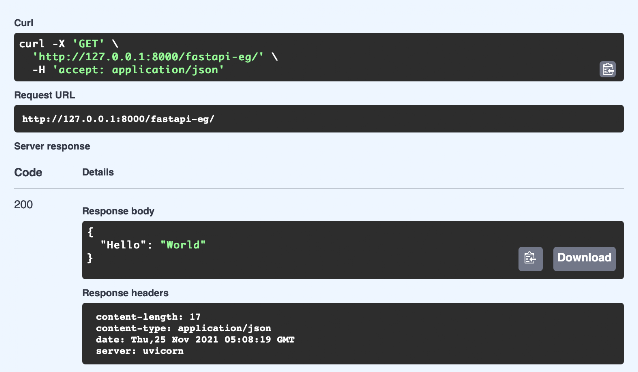
Root API run output on Swagger
I got two API endpoints up and running along with auto-generated Swagger documentation and ReDoc documentation. Pretty neat hah!.
Receiving JSON Payload in Request Body
-
We should define a model which will represent the received request body JSON payload. (I am sure we must have some way to handle the raw data, that we will explore later.)
-
Pydantic based model is used in FastAPI which provides Data validation and settings management using python type annotations.
Pydantic Item Model & Usage in a Route
...
from pydantic import BaseModel
...

class Item(BaseModel):
name: str
price: float
is_offer: Optional[bool] = None
...

@app.put("/items/{item_id}")
def update_item(item_id: int, item: Item):
return {"item_name": item.name, "item_id": item_id}
...-
To make the Pydantic model we extend our typical class to use
pydantic.BaseModel -
update_item()function define parameters with type hint which include Pydantic model Item. -
FastAPI will automatically validate the incoming JSON payload based on the definition of the model.
-
Validation errors etc will automatically handle by FastAPI.
Avoid sending None in Response JSON
Sometimes the records in the database contain None or Null values. It looks pretty bad if we have many None value attributes in Response JSON.
To make sure we are not sending attributes with None values in response, we can use the path operation decorator parameter response_model_exclude_unset.
E.g.
...

class ArtistModel(BaseModel):
id: str
name: str
age: Optional[int]

@app.post("/artists/", response_model=List[ArtistModel], response_model_exclude_unset=True)

async def get_artists():

    artists = await db["artists"].find().to_list(1000)

    return artists

...
Note:
-
Above is a partial code fragment. No import etc.
-
db["artists"].find().to_list(1000)brings data from MongoDB. -
If
agethe attribute has None value in the database, it will be excluded in response JSON.
Handling Query Parameters
Refer FastAPI documentation Query parameters page for the latest information.
Request URL = http://localhost:8000/artists?pageNumber=1&recordsPerPage=20
Business Rules:
-
recordsPerPageis optional with a default value of 10. -
pageNumberis required.
E.g. Code:
...

@app.post("/artists/", response_model=ArtistModel, response_model_exclude_unset=True)

async def get_artists(pageNumber:int, recordsPerPage: Optional[int] = 10):

    artists = await db["artists"].find(pageNumber).to_list(recordsPerPage)

    return artists

...
Note:
- We can make
recordsPerPageoptional without any default value withrecordsPerPage: Optional[int] = None.
Creating APIs that saves the data in MongoDB
Following a tutorial at the MongoDB website, I am trying to build a real API.
I created a new MongoDB cluster (500 MB, Free) at MongoDB Atlas Cloud.
I added dependencies in requirements.txt.
I used the source code provided in the tutorial. It has all the code in app.py the file. This approach is fine for POC but in real projects, we bring better structure.
I am able to run the project and save data in MongoDB successfully.