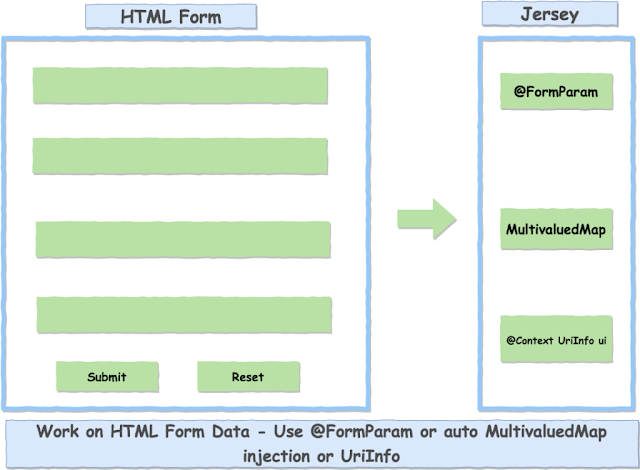
There are multiple ways for consuming HTML form data (application/x-www-form-urlencoded) in Jersey. Using @FormParam annotation we can inject Form values in the Resource method. We can use it just like other @*Param.
Jersey resource method needs to know they have to handle HTML form data, for it we explicitly specify @Consumes("application/x-www-form-urlencoded").
Use @FormParam
Using @FormParam we can inject specific HTML form parameters values in the Resource method. Its use is similar to other @*Param annotations.
File: FormParamResource.java
package in.geekmj.resource;

import javax.ws.rs.Consumes;
import javax.ws.rs.FormParam;
import javax.ws.rs.POST;
import javax.ws.rs.Path;
import javax.ws.rs.Produces;
import javax.ws.rs.core.Context;
import javax.ws.rs.core.MediaType;
import javax.ws.rs.core.MultivaluedMap;
import javax.ws.rs.core.Response;
import javax.ws.rs.core.UriInfo;

import org.springframework.stereotype.Component;

/\*

-
- @author geekmj Three ways to get Form data in Jersey
  \*/
  @Path("/form-data")
  @Produces(MediaType.TEXT_HTML)
  @Component
  public class FormParamResource {

      /*
       * Using @FormParam inject form data in method arguments
       *
       * @param name
       * @param phoneNumber
       * @return
       */
      @POST
      @Path("/form-param")
      @Consumes(MediaType.APPLICATION\_FORM\_URLENCODED)
      public Response getFormDataUsingFormParam(@FormParam("name") String name, @FormParam("phone") String phoneNumber) {

      	return Response.ok(getHtmlResponse(name, phoneNumber)).build();
      }

      private String getHtmlResponse(String name, String phoneNumber) {
      	StringBuilder responseStr = new StringBuilder("Form Data");
      	responseStr.append("Submitted form dataName : "+name+"Phone : "+phoneNumber+"");
      	return responseStr.toString();
      }

  }
We have used @FormParam to get names and phone from x-www-form-urlencoded form-data request.
Use MultivaluedMap in method injection
We can inject all Form values in the method as MultivaluedMap when method has consume("application/x-www-form-urlencoded") annotation.
Note: It may not work in Spring Boot when the Spring Web module is used. You may see a warning in the log saying A servlet request to the URI https://xyz.com/abc contains form parameters in the request body but the request body has been consumed by the servlet or a servlet filter accessing the request parameters. Only resource methods using @FormParam will work as expected. Resource methods consuming the request body by other means will not work as expected.
File: FormParamResource.java
package in.geekmj.resource;

import javax.ws.rs.Consumes;
import javax.ws.rs.FormParam;
import javax.ws.rs.POST;
import javax.ws.rs.Path;
import javax.ws.rs.Produces;
import javax.ws.rs.core.Context;
import javax.ws.rs.core.MediaType;
import javax.ws.rs.core.MultivaluedMap;
import javax.ws.rs.core.Response;
import javax.ws.rs.core.UriInfo;

import org.springframework.stereotype.Component;

/\*

-
- @author geekmj Three ways to get Form data in Jersey
  \*/
  @Path("/form-data")
  @Produces(MediaType.TEXT_HTML)
  @Component
  public class FormParamResource {

      /*
       * Using Multivalued Map inject form data in method single map argument
       * Note: It may not work if another Servlet is processing the request before Jersey Servlet or filter
       * @param name
       * @param phoneNumber
       * @return
       */
      @POST
      @Path("/multivalued-map")
      @Consumes(MediaType.APPLICATION_FORM_URLENCODED)
      public Response getFormDataUsingMultivaluedMap(MultivaluedMap formParams) {

      	//Same as formValues.get("name").get(0);
      	String name = formParams.getFirst("name");
      	String phoneNumber = formParams.getFirst("phone");
      	return Response.ok(getHtmlResponse(name, phoneNumber)).build();
      }

      private String getHtmlResponse(String name, String phoneNumber) {
      	StringBuilder responseStr = new StringBuilder("Form Data");
      	responseStr.append("Submitted form dataName : "+name+"Phone : "+phoneNumber+"");
      	return responseStr.toString();
      }

  }
Use UriInfo method injection with @Context
We can get all form values in MultivaluedMap using UriInfo.getQueryParameters() method. UriInfo can injected as method attribute using @Context annotation.
Note: It may not work in Spring Boot when Spring Web module used.
package in.geekmj.resource;

import javax.ws.rs.Consumes;
import javax.ws.rs.FormParam;
import javax.ws.rs.POST;
import javax.ws.rs.Path;
import javax.ws.rs.Produces;
import javax.ws.rs.core.Context;
import javax.ws.rs.core.MediaType;
import javax.ws.rs.core.MultivaluedMap;
import javax.ws.rs.core.Response;
import javax.ws.rs.core.UriInfo;

import org.springframework.stereotype.Component;

/\*

-
- @author geekmj Three ways to get Form data in Jersey
  \*/
  @Path("/form-data")
  @Produces(MediaType.TEXT_HTML)
  @Component
  public class FormParamResource {

      /*
       * Using Multivalued Map inject form data in method single map argument
       * Note: It may not work if another Servlet is processing the request before Jersey Servlet or filter
       * @param name
       * @param phoneNumber
       * @return
      */
      @POST
      @Path("/context")
      @Consumes(MediaType.APPLICATION_FORM_URLENCODED)
      public Response getFormDataUsingContext(@Context UriInfo ui) {

      	MultivaluedMap formValues = ui.getQueryParameters();

      	//Same as formValues.get("name").get(0);
      	String name = formValues.getFirst("name");
      	String phoneNumber = formValues.getFirst("phone");
      	return Response.ok(getHtmlResponse(name, phoneNumber)).build();
      }

      private String getHtmlResponse(String name, String phoneNumber) {
      	StringBuilder responseStr = new StringBuilder("Form Data");
      	responseStr.append("Submitted form dataName : "+name+"Phone : "+phoneNumber+"");
      	return responseStr.toString();
      }

  }
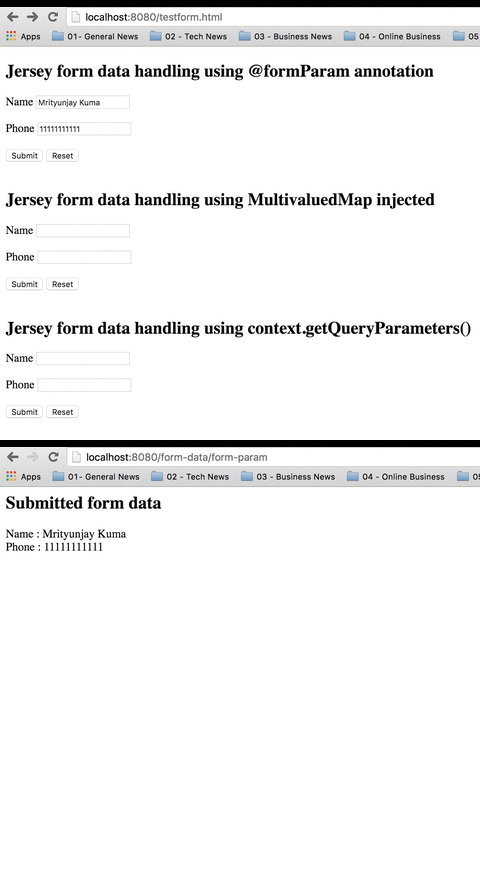
Testing form data handling by Jersey
File: testform.html
Form to test Jersey form data handling Jersey form data handling using
@formParam annotation Name Phone Jersey form data handling using MultivaluedMap
injected Name Phone Jersey form data handling using context.getQueryParameters()
Name Phone
Download the complete source code for this project and then follow this instruction to run the application.
Go to https://localhost:8080/testform.html.