Jersey (JAX-RS) supports multiple files upload. A dynamic number of files can also be uploaded.
In this tutorial we will solve the following problems:
-
Upload more than one file.
-
Upload dynamic numbers of files. Support to upload multiple files selected using input type file with multiple files selection enabled. E.g.
1. HTML form for multiple files upload
File: /src/main/resources/static/files-upload.html
Upload Files Test 2 Upload files Select multiple files Select File TagsThis form has two file inputs. and one supports multiple file selections. And another single file choice.
2.1 Multiple files upload resource method - using @FormDataParam
File: /src/main/java/in/geekmj/resource/FileUploadResource.java
package in.geekmj.resource;

import java.io.IOException;
import java.io.InputStream;
import java.nio.file.FileSystems;
import java.nio.file.Files;
import java.util.List;

import javax.ws.rs.Consumes;
import javax.ws.rs.DefaultValue;
import javax.ws.rs.POST;
import javax.ws.rs.Path;
import javax.ws.rs.core.MediaType;
import javax.ws.rs.core.Response;

import org.glassfish.jersey.media.multipart.BodyPartEntity;
import org.glassfish.jersey.media.multipart.FormDataBodyPart;
import org.glassfish.jersey.media.multipart.FormDataContentDisposition;
import org.glassfish.jersey.media.multipart.FormDataMultiPart;
import org.glassfish.jersey.media.multipart.FormDataParam;
import org.springframework.stereotype.Component;

/\*

-
- @author geekmj Single File and Multiple Files upload example
  \*/
  @Path("/upload")

@Component
public class FileUploadResource {

    @Path("/files")
    @POST
    @Consumes(MediaType.MULTIPART_FORM_DATA)
    public Response uploadFiles2(@DefaultValue("") @FormDataParam("tags") String tags,
    		@FormDataParam("files") List bodyParts,
    		@FormDataParam("files") FormDataContentDisposition fileDispositions,
    		@FormDataParam("file2") InputStream file2,
    		@FormDataParam("file2") FormDataContentDisposition fileDisposition2) {

    	StringBuffer fileDetails = new StringBuffer("");

    	/* Save multiple files */

    	for (int i = 0; i < bodyParts.size(); i++) {
    		/*
    		 * Casting FormDataBodyPart to BodyPartEntity, which can give us
    		 * InputStream for uploaded file
    		 */
    		BodyPartEntity bodyPartEntity = (BodyPartEntity) bodyParts.get(i).getEntity();
    		String fileName = bodyParts.get(i).getContentDisposition().getFileName();

    		saveFile(bodyPartEntity.getInputStream(), fileName);

    		fileDetails.append(" File saved at /Volumes/Drive2/temp/file/" + fileName);
    	}

    	/* Save File 2 */

    	String file2Name = fileDisposition2.getFileName();

    	saveFile(file2, file2Name);
    	fileDetails.append(" File saved at /Volumes/Drive2/temp/file/" + file2Name);
    	fileDetails.append(" Tag Details : " + tags);

    	System.out.println(fileDetails);

    	return Response.ok(fileDetails.toString()).build();
    }

    private void saveFile(InputStream file, String name) {
    	try {
    		/* Change directory path */
    		java.nio.file.Path path = FileSystems.getDefault().getPath("/Volumes/Drive2/temp/file/" + name);
    		/* Save InputStream as file */
    		Files.copy(file, path);
    	} catch (IOException ie) {
    		ie.printStackTrace();
    	}
    }

}
Multiple files is handled using List. Similarly we have List.
FormDataBodyPart.getEntity() return Object. This Object is of type BodyPartEntity. BodyPartEntity.getInputStream() method return InputStream.
FormDataContentDisposition can also get from FormDataBodyPart.getContentDisposition();
2.2 Multiple files upload resource method - using FormDataMultiPart
FormDataMultiPart injected automatically as a Resource method parameter. Method must have @Consume(“multipart/form-data”) annotation.
FormDataMultiPart provides access to all FormDataBodyPart objects. We may use it in place of @FormDataParam.
File: /src/main/java/in/geekmj/resource/FileUploadResource.java
package in.geekmj.resource;

import java.io.IOException;
import java.io.InputStream;
import java.nio.file.FileSystems;
import java.nio.file.Files;
import java.util.List;

import javax.ws.rs.Consumes;
import javax.ws.rs.DefaultValue;
import javax.ws.rs.POST;
import javax.ws.rs.Path;
import javax.ws.rs.core.MediaType;
import javax.ws.rs.core.Response;

import org.glassfish.jersey.media.multipart.BodyPartEntity;
import org.glassfish.jersey.media.multipart.FormDataBodyPart;
import org.glassfish.jersey.media.multipart.FormDataContentDisposition;
import org.glassfish.jersey.media.multipart.FormDataMultiPart;
import org.glassfish.jersey.media.multipart.FormDataParam;
import org.springframework.stereotype.Component;

/\*

-
- @author geekmj Single File and Multiple Files upload example
  \*/
  @Path("/upload")

@Component
public class FileUploadResource {

    @Path("/files2")
    @POST
    @Consumes(MediaType.MULTIPART_FORM_DATA)
    public Response uploadFiles(final FormDataMultiPart multiPart) {

    	List bodyParts = multiPart.getFields("files");

    	StringBuffer fileDetails = new StringBuffer("");

    	/* Save multiple files */
    	for (int i = 0; i < bodyParts.size(); i++) {
    		BodyPartEntity bodyPartEntity = (BodyPartEntity) bodyParts.get(i).getEntity();
    		String fileName = bodyParts.get(i).getContentDisposition().getFileName();
    		saveFile(bodyPartEntity.getInputStream(), fileName);
    		fileDetails.append(" File saved at /Volumes/Drive2/temp/file/" + fileName);
    	}

    	/* Save File 2 */

    	BodyPartEntity bodyPartEntity = ((BodyPartEntity) multiPart.getField("file2").getEntity());
    	String file2Name = multiPart.getField("file2").getFormDataContentDisposition().getFileName();
    	saveFile(bodyPartEntity.getInputStream(), file2Name);
    	fileDetails.append(" File saved at /Volumes/Drive2/temp/file/" + file2Name);

    	fileDetails.append(" Tag Details : " + multiPart.getField("tags").getValue());
    	System.out.println(fileDetails);

    	return Response.ok(fileDetails.toString()).build();
    }

    private void saveFile(InputStream file, String name) {
    	try {
    		/* Change directory path */
    		java.nio.file.Path path = FileSystems.getDefault().getPath("/Volumes/Drive2/temp/file/" + name);
    		/* Save InputStream as file */
    		Files.copy(file, path);
    	} catch (IOException ie) {
    		ie.printStackTrace();
    	}
    }

}
3. Test multiple files upload
Go to https://localhost:8080/files-upload.html.
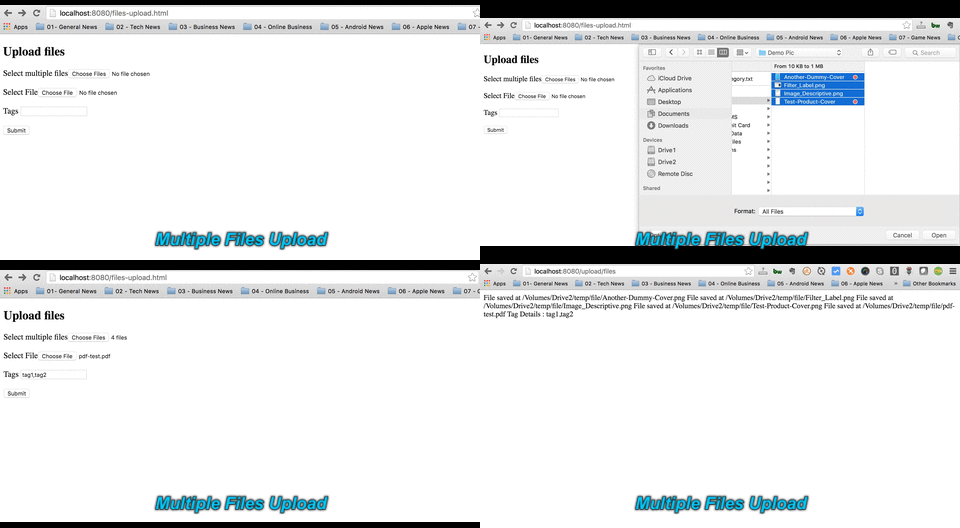
Change form action to /upload/files2 in /src/main/resources/static/files-upload.html to test multiple files uploading using [approach 2.2].